Cross DJ - Music Mixer App
- 4.1
- Rating
- 10.00M
- Installs
- Free
- Price

 Analysis by App-foxy
I approached Cross DJ as a practical music-making tool rather than a toy for tapping through effects. Developed by MIXVIBES, this free Music & Audio app is built around the familiar two-deck DJ idea, giving me a compact workspace for mixing, scratching, and preparing a performance away from a full desktop setup. Its promise is simple, but using it well depends on how comfortable you are with manual control and how much time you want to spend shaping a mix.
My overall impression is that it makes the most sense for someone who wants to experiment with transitions, practice DJ habits, or create a quick mix while travelling. It is less convincing as a complete replacement for established desktop software, especially if your work depends on detailed editing, a large production workflow, or a polished publishing pipeline. Still, the app has enough hands-on character to be useful, and its free entry point makes it easy to test before deciding whether it belongs in your regular creative routine.
From a song idea to a workable mix
The best way to start with Cross DJ is not by loading random tracks and immediately touching every control. I get better results when I first choose two songs with a clear relationship: similar energy, compatible rhythm, or a vocal and instrumental arrangement that leaves room for a transition. That small preparation step matters because the app gives me the tools to mix, but it cannot make an awkward song pairing sound natural.
You May Also Like

 Blood Strike: 2.5 Anniversary
Blood Strike’s Loadouts Turn Every Drop Into a Tactical Gamble
A close look at Blood Strike’s custom loadouts: how fast access to signature weapons reshapes its battle royale rhythm, rewards preparation, and narrows the gap between fights.

 Pandora - Music & Podcasts
Pandora’s Music Is Easy to Start, but Harder to Recover
Pandora’s strength is its low-effort path from a seed to a station. Its weak spot is how much confidence it asks you to place in connection, setup, and quiet recovery.

 8 Ball Pool
 Is Built on Rivalries, Rematches, and Routine
A close look at the rivalries, rematches, shared routines, and unanswered safety questions that turn a quick pool match into a persistent mobile community.

 Samsung Music
’s Quiet Strength Is Playing What You Already Own
Its reach comes less from spectacle than from dependable access to a personal library. That simplicity is both the app’s strongest retention engine and its ceiling.

 AccuWeather: Weather Radar
AccuWeather Review: A Quick, Clear Forecast for Everyday Decisions
For everyday plans, the best forecast is the one you can understand quickly. AccuWeather makes rain timing, radar, and local conditions easy to act on, with a few trade-offs.

 Hill Climb Racing
Why Hill Climb Racing Still Turns Crashes Into One More Run
A tiny car, a bumpy hill and one more upgrade: Hill Climb Racing keeps resurfacing because its simple chaos makes every near-miss feel personal.
More From Our News Desk
View All News


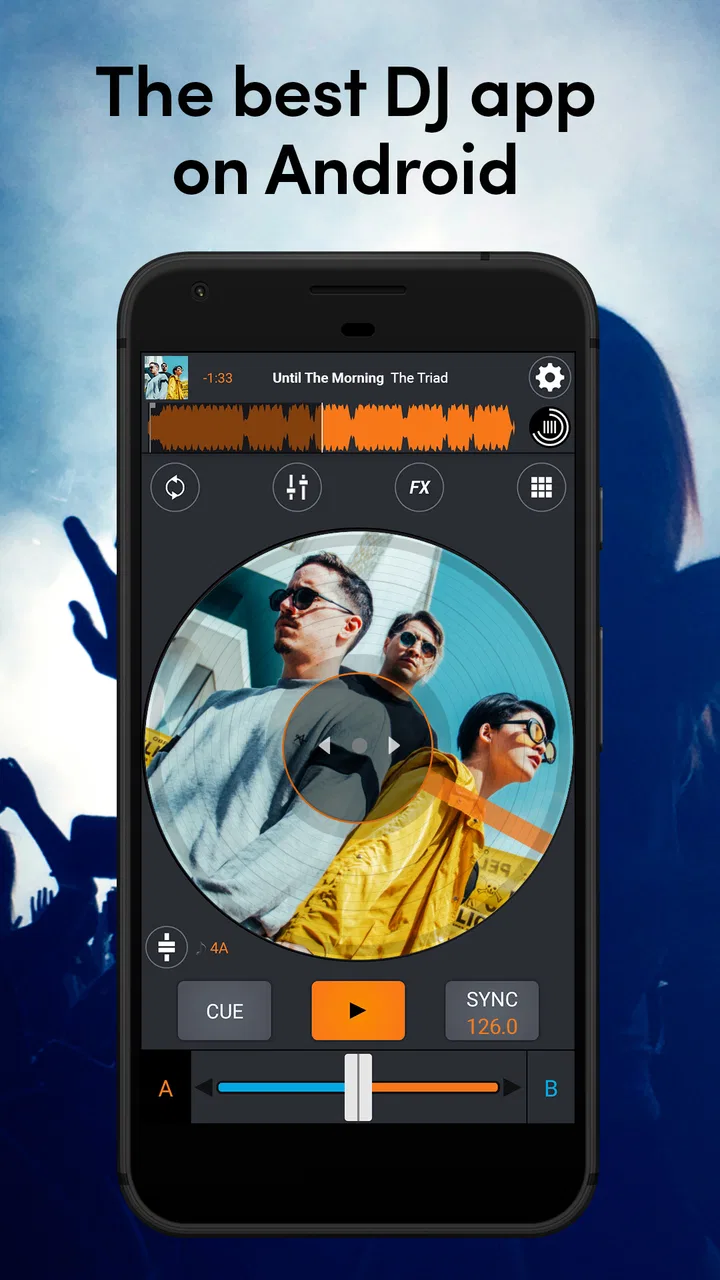
The two-deck layout encourages a straightforward creative process. One track becomes the foundation while the other waits to enter, and I can think about the mix in terms of timing, volume, phrasing, and movement. This is more useful than simply pressing play on a playlist because it makes me listen for the point where a new track should arrive. For beginners, that active decision-making is one of the app’s strongest educational qualities.
I also like that the interface feels aimed at direct interaction. A touchscreen can make the first contact with DJing less intimidating than a dense desktop arrangement full of panels and menus. You can explore the basic relationship between decks without first learning a complicated production environment. That makes the app approachable for casual creators who want to understand what a DJ actually does during a transition.
There is, however, an important difference between accessibility and simplicity. A smaller screen can make controls feel crowded, particularly when I am trying to adjust more than one element quickly. A phone is convenient for starting an idea, but it does not offer the same physical separation or tactile confidence as dedicated hardware. I would therefore treat the mobile interface as a portable practice surface, not as an automatic shortcut to professional performance.
Cross DJ is rated for Everyone, and that broad age positioning matches its basic appeal. It is suitable for curious listeners, new DJs, and people who want to make a small creative project without committing to expensive equipment. The app is free to install, although purchases inside the app range from $0.99 to $229.99 per item. That makes it sensible to begin with the free experience and decide later whether any paid addition genuinely improves your workflow.
Building a reliable starting routine
My preferred opening routine is deliberately restrained. I load the first track, listen for its structure, and identify a section where the energy is stable enough to support another song. Then I prepare the second deck and bring it in gradually instead of relying on a sudden change. This approach produces a cleaner result and also exposes whether the two tracks actually belong together.
A useful habit is to monitor the incoming song at a lower level before making it prominent. That lets me judge whether its rhythm and musical density fit the current track. If both songs are already busy, the transition can become muddy even when the timing is correct. Cross DJ is most rewarding when I use it to make those listening decisions rather than expecting the application to solve every musical problem for me.
For a first project, I would avoid trying to create a long continuous set. A short sequence with a clear beginning, middle, and ending is easier to evaluate. It also gives me a practical creative target: introduce one track, move between the two, and finish with intention. Once that feels controlled, I can extend the session and experiment with more ambitious combinations.
One non-obvious advantage of working this way is that the app turns spare listening time into structured practice. I can take a pair of songs I already know and test several entry points without setting up a full studio. That is valuable for learning musical timing, even if the final mix is never published. The limitation is that mobile practice can encourage visual control instead of careful listening, so I make a point of checking the result without constantly watching the screen.
Making the transition instead of just playing tracks
The central creative work happens when I move from selection to execution. A good transition is not only about starting the second track; it is about deciding what the listener should notice and what should remain in the background. I might let a rhythm establish itself before bringing in a melody, or use a quieter passage to change direction without making the switch feel abrupt.
Cross DJ works well for this kind of deliberate experimentation because the deck-based layout keeps the current track and the next track conceptually separate. I can prepare the next idea while the first one continues, which mirrors the mental workflow of a live DJ set. That separation is more useful than a basic music player, where the next song is mostly an automatic queue item rather than an active creative choice.
Scratching is another area where the touchscreen changes the experience. It can be enjoyable for short gestures and playful performance, but I would not expect the same accuracy as a physical turntable or controller. The phone surface gives me immediate feedback, yet my finger has less room and less tactile information. I see scratching here as a way to add character or practise movement, not as the ideal environment for developing advanced turntable technique.
Effects can also be tempting to overuse. When I am experimenting, it is easy to mistake constant processing for a more interesting mix. My better results come from treating effects as punctuation: a brief change before a transition, a moment that signals movement, or a way to create contrast. If every section is heavily altered, the original tracks lose definition and the mix becomes tiring.
The practical lesson is to use the app as an instrument for decisions, not as a button collection. The most convincing results come from track choice, timing, and restraint. The software can provide the workspace, but the musical shape still comes from the person using it.
Iteration: listening back with a critical ear
The first pass is rarely the one I would share. I usually notice problems only after listening away from the controls: a transition that arrives too early, an incoming track that dominates, or a change that sounds exciting visually but distracting when heard normally. This is where Cross DJ becomes more than a quick mixing novelty. It gives me a place to repeat the same idea and compare the result.
I recommend changing one variable at a time during revision. If I alter the entry point, level, and effect together, I cannot tell which decision improved the mix. A more disciplined method is to repeat the transition with a different timing choice, listen again, and then adjust the balance. That process is slower, but it creates transferable DJ skills rather than a lucky accident.
Another useful workflow is to make a rough version first and leave it alone for a while. When I return later, I hear the arrangement more objectively. This matters especially on a phone, where the immediacy of touching the screen can make a session feel more successful than it sounds. A mix should survive ordinary listening, not only the excitement of making it.
The app’s greatest iteration strength is convenience. I can test an idea without opening a full computer-based workstation, and that lowers the effort required to practise. Its weakness is that convenience can encourage shallow revisions. There is less room for detailed visual editing than in a traditional digital audio workstation, so I would not choose it when I need precise arrangement work, extensive sound design, or a carefully managed multitrack project.
Compared with a standard streaming player, Cross DJ offers far more creative control because I am actively shaping the relationship between songs. Compared with a desktop DJ application, it is lighter and easier to carry, but less comfortable for long sessions and detailed preparation. Compared with a full production app, it is focused on mixing rather than building a song from individual recorded parts. Those distinctions are important: the best alternative depends on whether the goal is a live-style mix, a composed track, or simple listening.
Preparing a result for handoff
When I reach a version I like, I think about where it is going next. A private practice mix has different requirements from something intended for friends or an audience. For practice, the value may be the act of learning a transition. For sharing, I need to listen for distracting level changes, accidental gestures, and an ending that feels unfinished.
Cross DJ is strongest before the final delivery stage: choosing tracks, trying combinations, practising movement, and shaping a live-style sequence. I would use it as a sketchpad for a creative idea or as a portable rehearsal tool. If the project needs extensive post-production, detailed cleanup, or a broader publishing workflow, I would move the work to a more specialized desktop tool rather than forcing the mobile app to handle a job outside its natural role.
A realistic everyday scenario would be preparing music for a small gathering. I could spend a commute testing how two suitable songs meet, make a short practice sequence, and then refine the weak transition later. The app would help me arrive with a more confident plan than simply assembling a playlist. I would still check the mix on the actual speakers or headphones I expect to use, because a transition that feels balanced on one device may feel very different elsewhere.
That scenario also shows why I would not promise effortless publishing. The creative mix may be ready, but the handoff depends on the intended destination and on how much finishing work I need. Cross DJ helps me make and rehearse the performance; it is not the whole chain from idea to professionally packaged release.
The current version is 4.1.1, and the app supports devices running Android 7.0 or later. That makes it relevant to many older Android phones, though the actual comfort of use will still depend on screen size, responsiveness, audio hardware, and how well the device handles multitasking. I would test a short session on the intended phone before planning an important performance around it.
Who will enjoy it, and who should choose something else
I would recommend Cross DJ to a beginner who wants to learn the logic of two-deck mixing without buying equipment immediately. It is also a good fit for a casual creator who enjoys rearranging familiar songs, a hobbyist preparing a small set, or an experienced DJ who wants a lightweight place to sketch transitions while away from a computer.
It is less suitable for someone whose main goal is composing original music from recorded parts. In that case, a digital audio workstation with deeper recording, sequencing, and editing tools would be a better match. I would also steer a club-focused performer toward dedicated hardware or a more comprehensive DJ platform if precise tactile control, extensive library preparation, or a highly dependable live setup is essential.
People who dislike hands-on experimentation may find the app demanding. It is not simply a matter of pressing play and receiving a finished mix. The reward comes from listening, adjusting, repeating, and accepting that some combinations will not work. That learning curve is reasonable, but it should be understood before downloading.
MIXVIBES has kept the entry barrier low by making the app free, and its reach is reflected in over 10 million installs, with an average rating of 4.1 from around 182 thousand ratings. Those figures suggest a broad audience, but they do not remove the need to judge the app against your own workflow. Popularity makes it worth trying; it does not make a mobile interface equivalent to a complete professional rig.
My creator verdict
After using it as a working tool, I see Cross DJ as a capable mobile mixing companion with a clear creative purpose. It helps me move from a loose idea to a playable sequence, and it encourages the kind of active listening that a normal music player cannot provide. The portability is the main attraction: I can practise the relationship between tracks wherever I have a suitable device and a little time.
Its limitations are equally clear. Touch controls cannot fully replace physical DJ hardware, and the app is not the right destination for deep production, elaborate editing, or every stage of professional delivery. I also need to manage my expectations around in-app purchases, whose individual prices can extend from $0.99 to $229.99. Starting free and paying only for a clearly useful addition is the sensible approach.
For me, the deciding question is not whether it can do everything. It cannot, and it does not need to. The better question is whether you want a portable space for mixing, scratching, and testing musical ideas. If the answer is yes, Cross DJ is worth trying, especially for learning and quick creative drafts. If you need a complete studio or a performance system built around hardware-level precision, I would choose a more specialized alternative and use this app only as a convenient sketching tool.
FAQs for Cross DJ - Music Mixer App
01What is Cross DJ - Music Mixer App, and who is it designed for?
Cross DJ is a mobile mixing application designed for beginners, hobbyists, and experienced DJs who want to create mixes directly from an Android or iOS device. It provides two virtual decks, beat synchronization, looping, effects, cue controls, and other tools commonly found in DJ software. It is useful for practicing, experimenting with transitions, or performing casual mixes without carrying dedicated equipment.
02Can I use my own music with Cross DJ, and what audio formats are supported?
The app generally allows you to load compatible tracks from your device or connected music library, although access can depend on the operating system, file permissions, and where the songs are stored. Locally downloaded audio is usually the most reliable option. Streaming services and protected files may not be available for mixing because of licensing restrictions, so users should check the app’s current compatibility details before downloading music specifically for it.
03Does Cross DJ include automatic beat matching and other beginner-friendly tools?
Yes, Cross DJ includes features intended to make mixing easier, including automatic beat matching, tempo adjustment, waveform displays, cue points, looping, and synchronized effects. These tools can help new users produce smoother transitions while they learn timing and phrasing. However, automatic synchronization is not perfect with every track, particularly songs with live drumming, unusual tempo changes, or inaccurate beat-grid analysis, so manual correction may sometimes be necessary.
04Is Cross DJ free to download, and are there in-app purchases or limitations?
Cross DJ may be available as a free download, but the exact features offered without payment can vary by platform and app version. Some advanced effects, recording options, audio tools, interface features, or advertising removal may require a premium upgrade or subscription. Before installing, review the store listing carefully to understand pricing, trial conditions, and whether purchases are one-time payments or recurring charges.
05Can I record mixes or connect Cross DJ to external DJ equipment?
The app can be suitable for recording mixes and practicing with headphones, depending on the features enabled in your version. Compatibility with external controllers, audio interfaces, MIDI devices, or split-cue setups may vary significantly between Android and iOS devices. You should verify supported hardware, required adapters, and operating-system requirements before purchasing equipment. For serious live performances, testing the complete setup in advance is strongly recommended.
Pros
- Intuitive two-deck layout makes mixing approachable for beginners.
- Supports external audio files for building personalized sets.
- Accurate beat syncing helps keep transitions smooth.
- Includes useful effects for adding variety to live mixes.
- Responsive controls work well on both phones and tablets.
Cons
- Some advanced tools require a paid upgrade.
- Audio quality may depend heavily on the device’s sound hardware.
- The interface can feel crowded on smaller phone screens.
- Long sessions may drain the battery quickly.
- Learning manual beatmatching takes time without a controller.

Cross DJ - Music Mixer App
Gallery